
Read it as data.
Get text, tables, cells, slide notes, and document structure. Feed Markdown or JSON into your next step.
jetformat text report.docx --format jsonFree · no accountExplore text extraction →Read, edit, and convert Word, Excel, PowerPoint, and PDF. A local CLI for the document work in your scripts, pipelines, and AI agents.
brew install jetformat/tap/jetformatnpm & downloadsmacOS · Linux · Windows amd64 + arm64
Paid jobs contact billing. Optional telemetry can be disabled. HTML rendering uses a separate service.
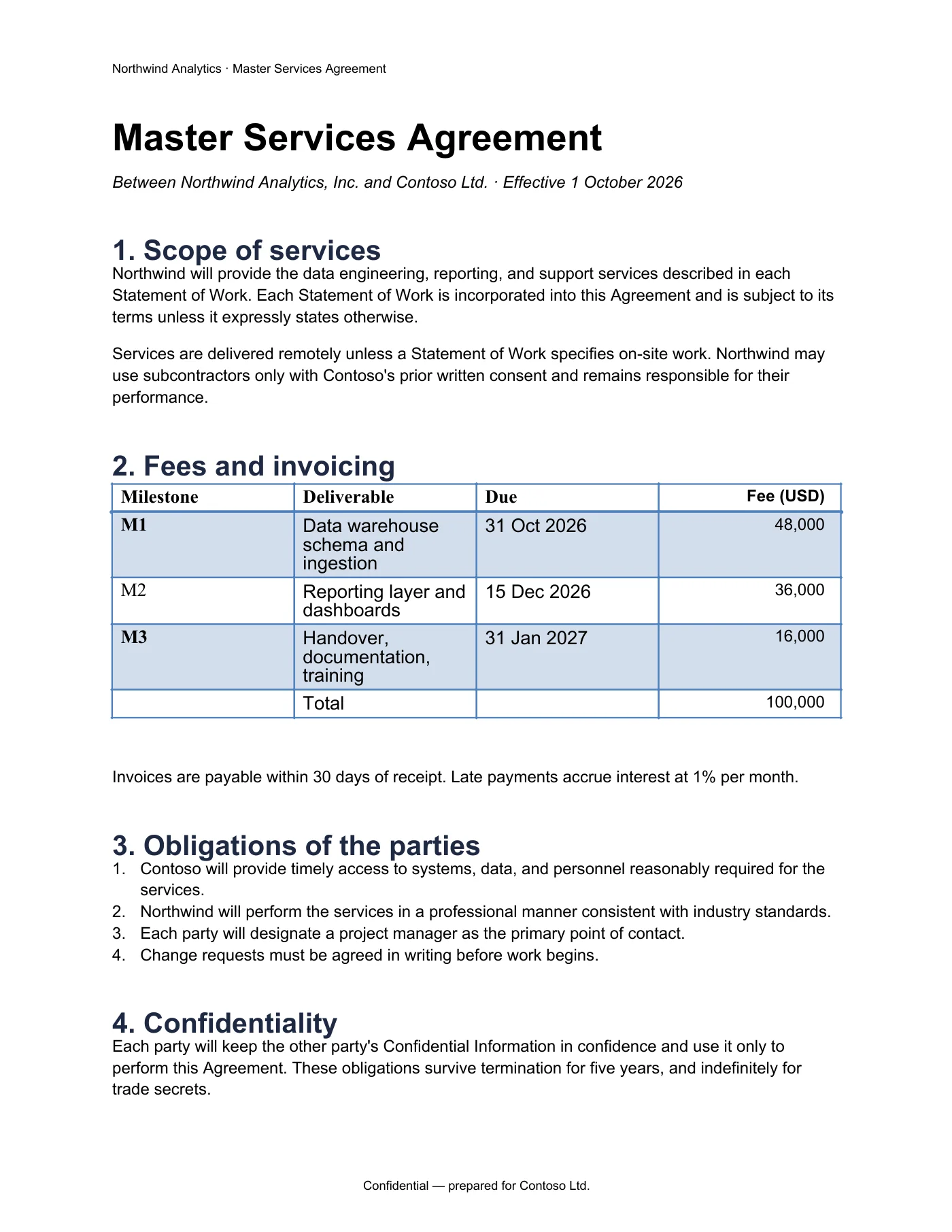 PDF preview ↗
jetformat word inspect contract.docx --json
{
  "paragraphs": 48,
  "tables": 2,
  "images": 0,
  "headers": 1,
  "footers": 1,
  "content_controls": 0
} PDF preview ↗
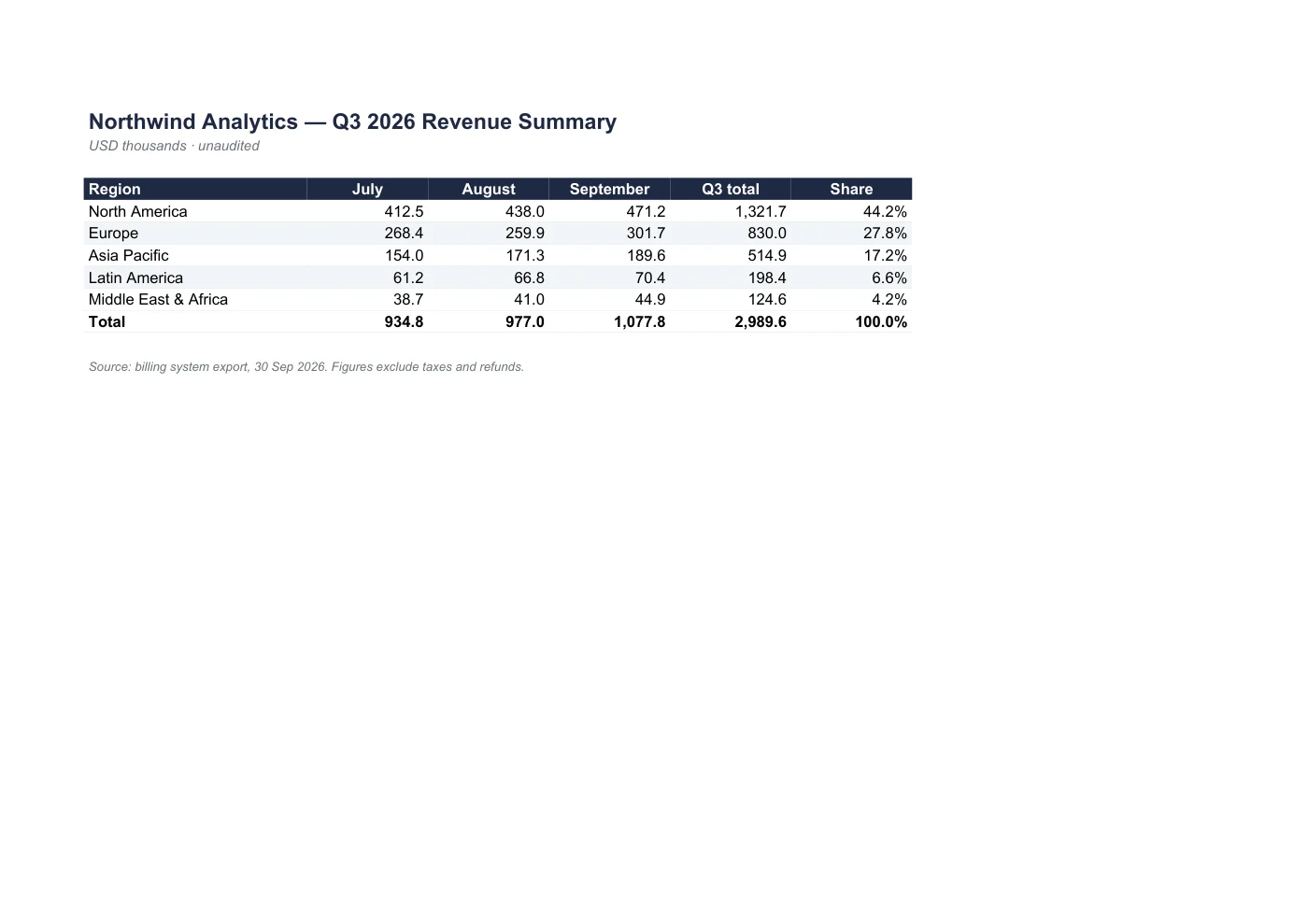
jetformat excel get q3-summary.xlsx --sheet "Q3 Summary" --cell E5
Sheet: Q3 Summary
Cell: E5
Value: 1,321.7
 PDF preview ↗
jetformat text board-deck.pptx
Q3 2026 Board Review
Revenue, pipeline, and hiring · Northwind Analytics
Highlights
•  Revenue $3.39M, up 14% quarter over quarter
•  Net revenue retention 118%; churn under 1.5% for the third quarter
•  Pipeline coverage 3.2x for Q4 target
Sample files processed by Jetformat. Preview and text shown together.
Start with an existing file. Read what is inside, make a focused change, and review the result.
Get text, tables, cells, slide notes, and document structure. Feed Markdown or JSON into your next step.
jetformat text report.docx --format jsonFree · no accountExplore text extraction →Fill a Word template, update spreadsheet cells, reorder a deck, or assemble the pages of a PDF.
jetformat ppt reorder deck.pptx --from 1 --to 3 -o revised.pptxWrites use creditsExplore document automation →Convert Office documents to PDF and render pages for review. Inspect the result before it enters your pipeline.
jetformat word to-pdf report.docx -o report.pdfLocal Office and PDF processingExplore PDF conversion →Explore the actual v0.1.8 command catalog. Search here, then run it on your own machine.
jetformat word accept-revisionsAccept tracked changes, all or by one authorReference ↗jetformat word add-chartInsert a chart with sample data and an embedded workbook; edit the data in Word or with the libraryReference ↗jetformat word add-imageInsert an inline image in a paragraph (not a watermark)Reference ↗jetformat word add-paragraphAppend a plain-text paragraph at the end of the documentReference ↗jetformat word add-shapeInsert a preset auto shape (rect, roundRect, ellipse, arrows, stars, ...) inline or floatingReference ↗jetformat word add-tableAppend a table; each --row is a comma-separated list of cellsReference ↗jetformat word add-textboxInsert a text box (white, thin black outline) inline or floating, with its textReference ↗jetformat word bookmarkAdd an empty bookmark or replace a named bookmark's contentReference ↗No commands match your search. Try another format or a shorter task name.
327 runnable command paths, including help and shell completion. Aliases are counted once. Choose a reference to check inputs, options, and billing before running a command.
Let a coding agent read structured text, choose a command, and return a file you can inspect. Use the same CLI from an interactive terminal or an automated job.
No Microsoft Office or LibreOffice required. Use your own fonts for Office rendering.
userTurn board-deck.pptx into a PDF and show me page 1.
$ jetformat ppt to-pdf board-deck.pptx -o board-deck.pdf
Wrote: board-deck.pdf
$ jetformat pdf render board-deck.pdf --pages 1 --width 1600 -o preview
Wrote: preview/page-0001.png
agentJetformat wrote board-deck.pdf (5 pages). The first page is in preview/page-0001.png. Nothing left this machine.
Use Homebrew, npm, or a native binary. Read-only commands are free and need no account.
Pro $9/month · Team $39/month
Prepaid credits from $10.
Office writes use credits per command; PDF operations use page-based billing. See pricing and details →
brew install jetformat/tap/jetformatnpm install -g jetformatVersion 0.1.8. Extract and put jetformat on PATH.
jetformat --version
jetformat word to-pdf report.docx -o report.pdfStart with the structure of the document, then choose the right operation.
Get the value you need without opening a spreadsheet application.
Build a repeatable handoff and check every document boundary.
Facts you can check. Jetformat is a single binary with its own engines for DOCX, XLSX, PPTX, and PDF, so a headless Linux box or a laptop reads, edits, and converts documents without an office suite and with local Office and PDF processing. HTML rendering uses a separate service.
| Jetformatthis product | LibreOffice headless | Office + COM automation | Upload APIs | |
|---|---|---|---|---|
| What you install | One CLI binary | LibreOffice and suitable fonts | Windows, Microsoft Office, a licence | Nothing, but an account and a network path |
| Runs in a headless Linux container | Yes | Yes, in headless mode | No | Yes, by calling out |
| Where the document goes | Local Office/PDF; separate HTML renderer | Stays on the machine | Stays on the machine | Uploaded to the vendor |
| Free on one machine | 80 credits a month; plans and packs | Free | Needs an Office licence | Vendor-specific pricing |
| Edit the file itself (cells, slides, templates) | Yes; Office writes use 1 credit per command | Macros and Basic scripting | Full object model, Windows only | Vendor-specific features |
| PDF tools (merge, fill, sign, render) | Yes | PDF export and Draw editing | Product-specific features | Vendor-specific features |
| Coding agents | Skill, Harness plugin, model guide | Shell out yourself | Not on macOS or Linux | HTTP client |
No. The CLI is closed-source commercial software. The Codex Skill and DeepSeek Harness plugin are small adapters that start that CLI.
Office and ordinary PDF processing run locally; billing does not receive document contents. HTML uses a separate renderer, and timestamping contacts the configured timestamp authority. Review those endpoints before processing sensitive files.
DOCX, XLSX, PPTX, PDF, and HTML. Conversion to PDF is one part of the CLI: the same binary inspects a document as JSON, reads and writes cells, fills Word templates, reorders slides, and merges, fills, encrypts, or signs PDFs. Legacy .doc, .xls, .ppt, and macro-enabled files are out of scope.
No. Jetformat has its own Go engine. Fonts come from the machine or from a directory you pass with --font-dir.
Yes. jetformat text prints a DOCX, XLSX, PPTX, or PDF in reading order, free and without an account. --format markdown keeps headings, lists, and tables, and gives each sheet as a grid with row numbers and column letters; --format json returns the same structure as data. It is what the Skill and Harness plugin call when an agent needs to read a document rather than convert it.
No. text and pdf to-word read existing text layers. Scanned pages without text will not produce useful output.
Install the CLI, then add the Codex Skill, the DeepSeek Harness plugin, or paste the model guide into AGENTS.md. The agent runs jetformat and reports the file it wrote.
Reading is free; writing uses credits. text, inspect, get, notes, validate, and every read-only command never cost anything and need no account. Writing a PDF page (convert, render, merge, fill, sign) costs 1 credit per page; writing an Office file (set, template, reorder) costs 1 credit per command. Every account gets 80 free credits a month.
The CLI exits non-zero, prints the error, and nothing is charged.